Rag
RAG
Retrieval-augmented Generation (RAG) is one of the cutting-edge technologies in large-scale models that is currently receiving a lot of attention. Its working principle is that when the model needs to generate text or answer questions, it first retrieves relevant information from a vast collection of documents. The retrieved information is then used to guide the generation process, significantly improving the quality and accuracy of the generated text. In this way, RAG is able to provide more precise and meaningful answers when dealing with complex questions, making it one of the significant advancements in the field of natural language processing. The superiority of this method lies in its combination of the strengths of retrieval and generation, enabling the model to not only produce fluent text but also to provide evidence-based answers based on real data.
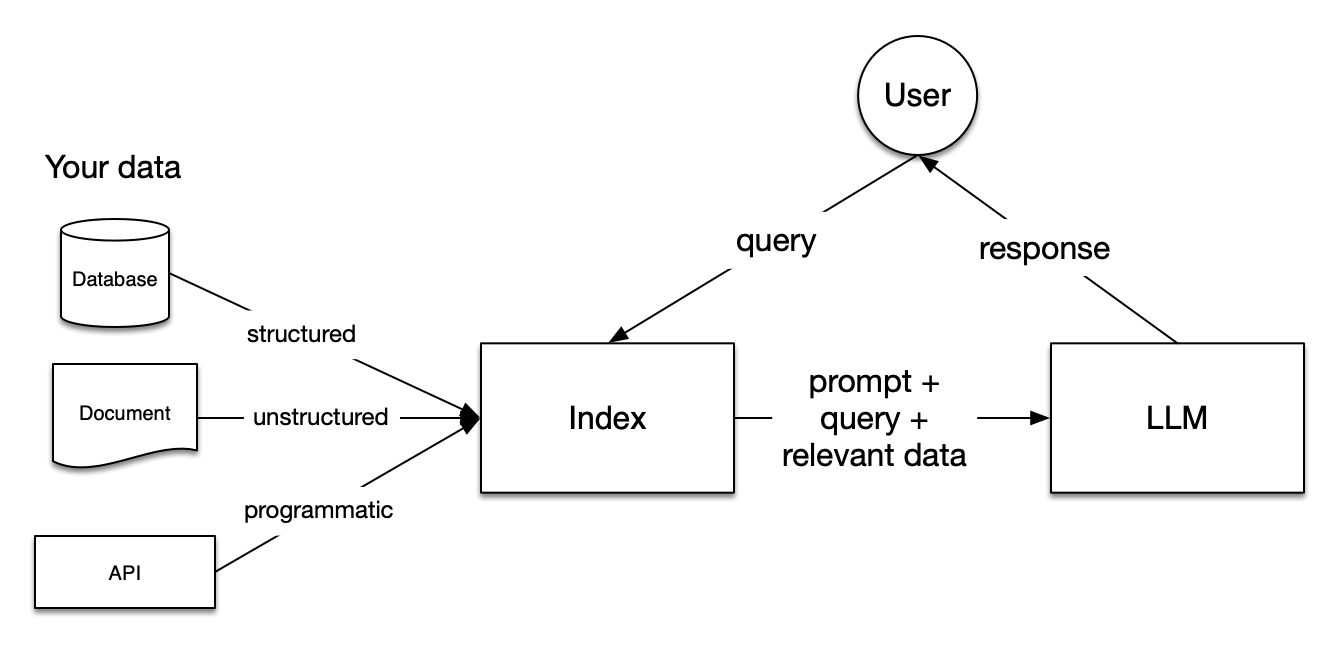
This article demonstrates how to build your own RAG application using LazyLLM.
Let's look at an example, rag.py:
# -*- coding: utf-8 -*-

import lazyllm
from lazyllm import (
    pipeline,
    parallel,
    bind,
    SentenceSplitter,
    Document,
    Retriever,
    Reranker,
)

# ----- Part 1 ----- #

prompt = (
    "You will play the role of an AI Q&A assistant and complete a dialogue task. In this task, "
    "you need to provide your answer based on the given context and question."
)

documents = Document(
    dataset_path="rag_master", embed=lazyllm.OnlineEmbeddingModule(), create_ui=False
)

documents.create_node_group(
    name="sentences", transform=SentenceSplitter, chunk_size=1024, chunk_overlap=100
)

# history has the form of [[query1, answer1], [quer2, answer2], ...]
history = []

# ----- Part 2 ----- #

with pipeline() as ppl:

    # ----- 2.1 ----- #

    with parallel().sum as ppl.prl:
        prl.retriever1 = Retriever(
            documents,
            group_name="CoarseChunk",
            similarity="bm25_chinese",
            similarity_cut_off=0.003,
            topk=3,
        )
        prl.retriever2 = Retriever(
            documents, group_name="sentences", similarity="cosine", topk=3
        )

    # ----- 2.2 ----- #

    ppl.reranker = Reranker(
        "ModuleReranker", model="bge-reranker-large", topk=1
    ) | bind(query=ppl.input)

    # ----- 2.3 ----- #

    ppl.formatter = (
        lambda nodes, query: dict(
            context_str="".join([node.get_content() for node in nodes]), query=query
        )
    ) | bind(query=ppl.input)

    # ----- 2.4 ----- #

    ppl.llm = lazyllm.OnlineChatModule(stream=False).prompt(
        lazyllm.ChatPrompter(prompt, extro_keys=["context_str"])
    ) | bind(llm_chat_history=history)

# ----- Part 3 ----- #

rag = lazyllm.ActionModule(ppl)
rag.start()

while True:
    query = input("query(enter 'quit' to exit): ")
    if query == "quit":
        break
    res = rag(query)
    print(f"answer: {str(res)}\n")
    history.append([query, res])
To run this example, you first need to set up the environment according to the "Environment Preparation" section in the Getting Started. Then, configure the variables for the DaliyNew platform that we applied for:
export LAZYLLM_SENSENOVA_API_KEY=<your api key>
export LAZYLLM_SENSENOVA_SECRET_KEY=<your secret key>
and the local directory that needs to be retrieved (note that this directory refers to the parent directory of the data directory. For example, if our data is located at /d1/d2/d3/, then the value here should be /d1/d2):
export LAZYLLM_DATA_PATH=</path/to/data/dir> # rag data is in `/path/to/data/dir/rag_master` in this example
and run:
After seeing the successful execution prompt, enter the term you want to search for and wait for the program to return the results.
This example is quite complex, so let's break it down in detail.
First, let's look at Part 1, which mainly involves preparing some data that will be used later.
Initially, we specify a prompter for this application, which helps guide the AI to prioritize answering questions based on the document content we provide.
Next, we convert the content of local documents into vectors, primarily done by the Document class. It traverses the specified directory, parses documents according to specified rules, and then uses the embedding module to convert them into vectors and save them.
Then, we create a node group named sentences, specifying SentenceSplitter as the conversion rule, which splits documents into chunks of a specified size with some overlap between adjacent chunks. For the usage of SentenceSplitter, you can refer to SentenceSplitter.
The history field is used to save the context content.
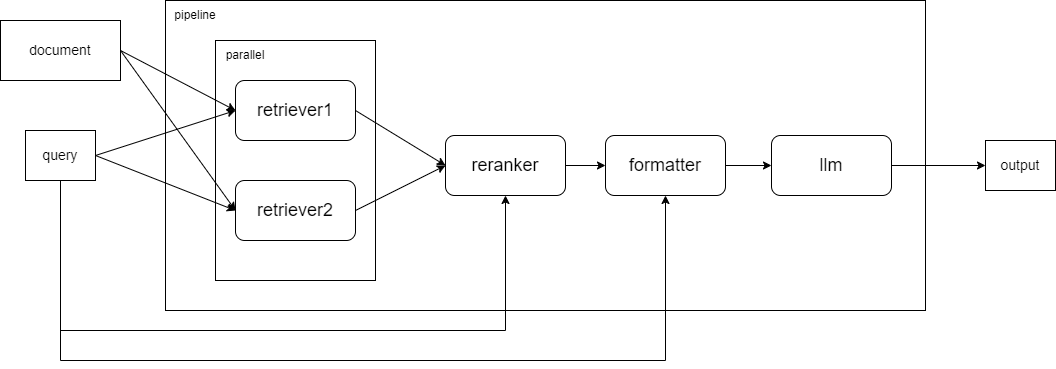
Moving on to Part 2, which mainly involves creating a pipeline for the entire processing process. The relationship between the modules in the example is as follows:
-
2.1 Adds retriever1, which uses SentenceSplitter to split documents with a chunk_size of 1024 and a chunk_overlap of 100, and uses bm25_chinese to sort documents by similarity, discarding documents with a similarity less than 0.003, and finally takes the top 3 most similar documents; retriever2 uses the custom sentences group, calculates similarity using cosine, and takes the top 3 most similar documents. For the interface usage of Retriever, you can refer to Retriever.
-
2.2 The Reranker module combines and sorts the results from the two Retriever modules in 2.1, taking the best-ranked document to pass to the large model as a reference for answering. Note that the user's input is also passed in for the Reranker to consider through the bind() function. The interface for Reranker can be referenced at Reranker.
-
2.3 Creates a formatter that concatenates the document content returned by the Reranker in the previous step.
-
2.4 Receives reference data specified by the user and, combined with the context (passed to our large model through bind() with history), obtains the result.
In Part 3, since the Pipeline cannot be executed directly, we use ActionModule to convert it into an executable module. The subsequent process is similar to that in the Getting Started, so it will not be repeated here.